الخميس، 28 يناير 2016

How to add all your Facebook contacts to your WhatsApp Messenger

Though I’ve noticed it for quite a long time and I just feel I should share it with you here to those who don’t already know this. Have you been spying on someone on Facebook? Or you’ve been looking for means to get their numbers but didn’t know how to ask them? The truth is they already have your own number.


This is why I don’t encourage adding your phone numbers to your Facebook  profile. By now you are already aware that Facebook owns WhatsApp and they are working  to incorporate a lot of things into whatsApp. Very soon, you’ll see the like button on WhatsApp(if it can appear on BBM, WhatsApp is not an exemption) but wait till then. 

Facebook automatically add all your Facebook contacts to your whatsapp messenger without your knowledge as long as they have their numbers added to their facebook profile.

How Do I Check?
Just log in to your Facebook messenger from your device, and in few minutes, all the contacts with numbers will appear on your whatsApp plus those you’ve never spoken on Facebook before. Even that babe or that dude that has been forming add to get will also appear on your WhatsApp Messenger.

I know some of you will say this is chatting made easy, but to me it’s risky. To the guys, it’s an easy catch to get the babe but at the other end, it exposes your privacy, and scammers can easily get your contact forming as though they've known you before.

My one cent advice, take precautions.

Cheapest Data Plan For All PC and iOS Users on Glo Network

This is exclusively to all iOS user and to those Android devices which IMEI cannot be changed. You might be aware of it but not all are aware of it. I’m going to sure you how to show you how to get 2.5GB for N1,500.


It’s an undoubted fact that http://pinkberrylicious.blogspot.com /2016/01/how-i-got-glo-6gb-for-n1500-works-on.html" target="_blank">Glo is one of the cheapest network in terms of data and I’m loving it that way.  This plan works on iOS, windows, PC and all android devices. No need of tweaking anything. It’s just a direct subscription and you are good to go.

How Can I Get This Plan?
It’s so simple and straight forward. First of all subscribe for Go N1,000 for 1.5GB by dialing *777#, follow the prompt and chose monthly data plan until you get to something like the image below.

Your data will be activated. On activation, dial the code again *777*1*1*6# or *777# then follow the prompt.


Choose monthly data booster>>N500 will bededucted from your account and your data will be topped up with extra 1GB making it 2.5GB.

Note that data booster exhaust when your plan ends. Atleast, this is way better than using big amount of money to subscribe for data on your iPad/iPhone or Qualcomm devices. #DataMadeEasy

How I Got Glo 6GB For N1,500 - Works on All Devices

You are probably reading this because you are data conscious, you want something more affordable that you can download with or something that will work perfectly on your device. Well, think no further because this post comes right in time.

Glo has been a life safer for some of us since 1900BC and I'll like to unlock this awesome features to those who don't know it exist. To those who already know it exist or using it, you deserve a cool glass of juice in such a weekend like this.


I'm going to show you how I got 6GB for N1,500 using my Glo line. The first thing that will perhaps comes to your mind is does glo have plan like this? the question can only be answered spiritually and not physically.

How Did I Get 6GB For N1,500?
You are all aware that you can get 3GB for N1,000 by dialing *777*21#... I can hear someone saying a big YES! Good...

So I first of all subscribed for Glo 3GB for N1k on my device and then activated the Glo weekend plan of N500 for 3GB by dialing *777# and then follow the prompt...

The weekend plan was activated the moment I connected to the net.

Note
You cannot use the two plan at thesame time. What I did was to pulse my Blackberry subscription by changing my apn to glosecure. Immediate the plan was activated and the speed is completely out of this world.

Who Should Use This Plan?
Those who have something big to download over the weekend. If Airtel 1GB for N100 didn't work for you, this will work out for you.

Will it work on my Smart Device?
Yes, it works on all device.

This trick is a hit Back to Back from Glo BIS to Glo 12GB for N3,500, to unlimited 4G internet surfing... Yet, some people are still wasting huge amount of money on data. Kai! ... they deserve to be caned.

Best Cell Phone Spy App For Apple

Cell phone usage is extremely high and there are not many people that do not use a cell phone. It has become more than a phone; cell phones are now a big part of everyday life, in both personal and business uses. Because cell phones are now used so frequently there are many different applications that can also be used on the phone. These applications can help promote productivity, help protect privacy and some are just for fun. To help with productivity and privacy, however, a cell phone spy app is the app that should be downloaded on every Apple device.  

What Does It Do?

A remotecell Phone spy software free download can allow any person to remotely connect to another phone. The app links to the other phone and you have immediate access to the device and the information contained on it. This allows a user to monitor exactly how and when a cell phone is being used and to determine if it is being used inappropriately or too often so the situation can be addressed and handled immediately.


What Is The Best Cell Phone Spy Software?

With all of the different apps on the market it can be tough to make a decision on which one to pick. There are so many different options available with different features. One of the best ones with the most features available is Auto Forward. With Auto Forward a user can have access to all calls made to and from the device, as well as text messages an iMessages, both old and deleted. This is an important feature to note, because most tracking applications cannot monitor iMessages, only regular SMS text messages. An Auto Forward user will also have access to all popular messenger applications, emails, all multimedia files and web browsing that is done on the phone. Again, even if information is deleted on the phone Auto Forward allows you to see that information.


How To Spy On A Cell Phone

It’s very easy to start once you decide to download the application. It’s a quick and easy 3 step installation and then you can remotely connect to other devices. You can log in to your user account and dashboard from a tablet, computer or another phone and see real-time coverage of the device that you are monitoring. If you aren’t too comfortable with new technology, no worries – Auto Forward provides full support and full video tutorials to help you get the hang of the application.

Install Auto Forward On Your Apple Devices


Auto Forward gives the user the ability to easily monitorApple devices. It is compatible with all Apple phones and with iPads, and has support in all countries and under all cell phone providers. The device must be jailbroken in order for the app to be installed.  When this is installed on your Apple devices you can make sure that the device is being used appropriately with little to no hassle on your part. 


Hidden Features of iOS 9 that Apple Didn’t Talk About

Hidden Features of iOS 9 that Apple Didn’t Talk About
iOS 9 is full of enhancements that will make a big impact on your life. With the mobile revolution, your apps are gaining more and more popularity. New features such as multitasking on iPad make you productive.

Siri is much more proactive and could do more than ever. It will help you do things even before you ask. However, there are several hidden features that not many are talking about. These features will have a deep impact on iOS app development. Let’s take a quick look at these unknown features that will help you gain more from iOS 9.

Searchable Settings
Now you can find settings just by searching for them. Thanks to a search box on top, you can quickly search for the information that you want easily without the need to navigate through layers of menus to reach your destination.

Picture-in-Picture Video Mode (Available in newer iPads Only)
Well, if you have a new version of iPad such as iPad Air, iPad Air 2, iPad Mini 2 or later, you can watch a video on your iPad while at the same time do something else. So multi-tasking gets easy with this new functionality. Here is how it works: simply start a video in Safari and tap the video to bring up the control interface — you can look for the icon appearing like a box within a box. Tap on that box, and it’ll float a new box that’ll stick around even as you navigate from one app to another app. You can drag the video to place it in any corner.

Detailed Battery Usage
Are you unable to figure out which of your apps are draining your battery the most? iOS 9 will be able to tell you not just about the apps that drain out your battery the most, but also how much time it spent in the background. To get access to the new info, go to Settings > Battery, tap the clock icon at the top of the app list.

Low Power Mode
Low on battery? You don’t have to worry anymore. With iOS 9, you will be asked if you want to enable “Low Power Mode.” When toggled, this mode will disable mail fetch, app refresh in the background, and automatic downloads. This might help you get extra time out of your battery. Once you plug your phone to the charger, low power mode will get disabled itself.  
You can turn Low Power Mode setting on manually under Settings > Battery.

Option to Calculate in the Search Bar
Now be ready to make quick and simple calculations in the search bar itself. This is an easy way to calculate without worrying about installing a full-featured app. Just pull down or swipe to the left to bring the search bar and it will do basic math.

Request Desktop Site
You often go around in circles browsing website on your iPhone. The problem is due to bad mobile website. In such scenario, you could only wish to load the desktop version of that page. Now your wish is granted in iOS 9. Simply hold the refresh button in URL bar and you would receive a prompt in few seconds requesting you to allow the desktop version of the current page.

We hope these features, many of which you might not otherwise stumble upon on your own will help you leverage iOS in an effective manner. 

الأربعاء، 27 يناير 2016

How to Transfer Data Contacts from Samsung A5/A3 to A8?


How to Transfer Data Contacts from Samsung A5/A3 to A8?

Many people change their phones frequently and they are need to transfer data contacts from old Samsung Galaxy A3/A5 to new Samsung Galaxy A8 phones.If you have bought a new Samsung Galaxy A8 or Samsung Galaxy A9,the first thin you need to do is transfer all data including contacts, text messages, photos, videos, calendar, notes, whatsapp data, call logs from Samsung A3/A5 to Galaxy A8. If you have a need to cope your old Galaxy phone data to the new Samsung Galaxy A8 or A9, you come to the right place.


This article will show you a quick way to transfer data contacts from Samsung A5/A3 to A8, first of all, you need a professional transfer tool -Phone to Phone Transfer.It takes only a few minutes to fully transfer all data from Samsung to Samsung Galaxy A8/A9. Including contacts transfer, text messages, videos, music and photos are also transferred to the new device at the same time.


How to Transfer Data Contacts from Samsung A5/A3 to A8?

Step 1. Launch the program and connect both Galaxy phones to computer

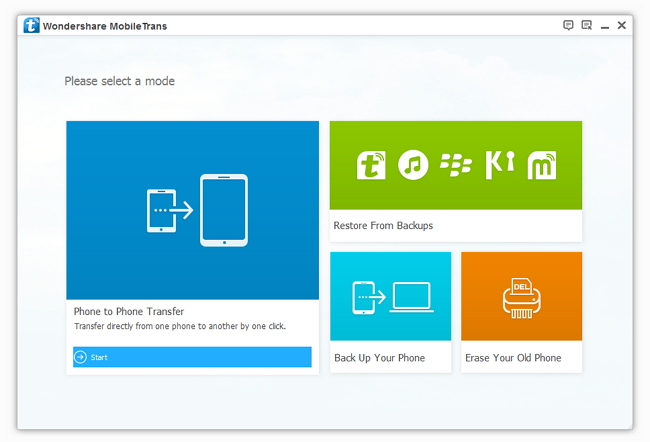
To start with, launch this Phone to Phone Transfer program after installing it. The primary window will pop up, select “Phone to Phone Transfer”, click “Start”. Connect both of your Galaxy phones to computer via 2 USB cables. This program will automatically detect your devices and shows it in the primary window.


Step 2. Connect your Galaxy A5/A3 and Samsung A8 with the PC

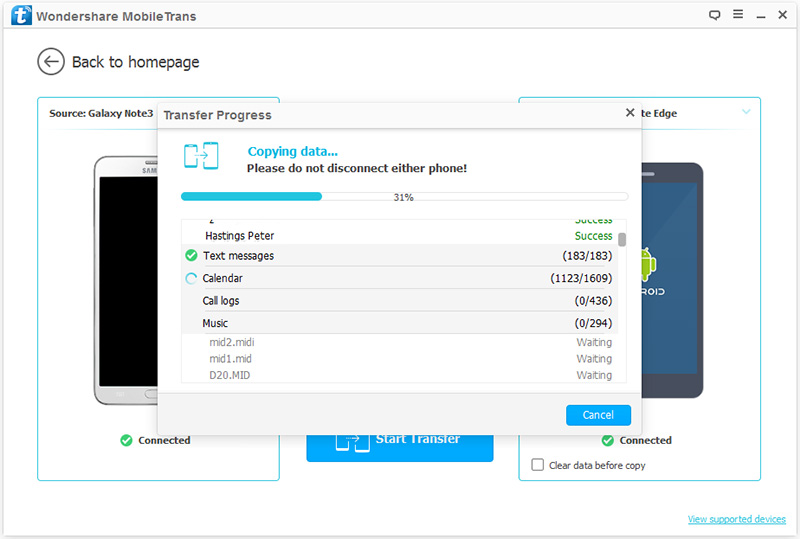
Connect your Samsung phones to computer with USB cables,then you will see the window below. Make sure that your Samsung Galaxy phones is Destination. If they are in the wrong place, click “Flip” button to change the position.


Step 3. Transfer data contacts to new Samsung galaxy A8

As you see, this program allows you to transfer everything from your old Samsung Galaxy phone to the new one. For those who only want to cope all data, please remove marks before the corresponding content. Then click “Start Copy” button to begin the transfer. When the transfer over, don’t forget to click “Completed” button.


More related articles  

http://pinkberrylicious.blogspot.com /2016/01/transfer-text-messages-to-s6-edge.html">How to Transfer Text Messages from S2/S3/S4/S5 to S6 (Edge)

http://pinkberrylicious.blogspot.com /2015/11/transfer-contactsphotos-between-old-samsung-and-a8.html">Transfer Contacts/Photos between old Samsung and Galaxy A8

http://pinkberrylicious.blogspot.com /2015/11/transfer-photosvideos-from-samsung-to-a8.html">How to Transfer Photos/Videos from Samsung to Galaxy A8?

http://pinkberrylicious.blogspot.com /2015/10/moving-all-datawhatsapp-messages-from-samsung-to-a8.html">Moving All Data/Whatsapp Messages from Samsung Ace/Note/Galaxy S to A8

How to Transfer Old Samsung Contacts to Samsung Galaxy A9


Samsung Tab 2

New Hard Reset / Factory Reset Method Using Odin3 Flasher:


In case you cannot put the Samsung Galaxy Tab 2 10.1 GT-P5100 Into Recovery Mode for any reason, Or the Normal Hard Reset operation does not solve your problem, Then you can use this new method to Hard Reset the device so easy, This New Method will reprogram the User area, And it can solve many software errors too, Just follow the steps below:

- Download and Extract Samsung Galaxy Tab 2 10.1 GT-P5100 Hard Reset File.
- Download Odin3 flasher.
- Put your phone into Download Mode.
- Run Odin3.exe
- Click on CSC button and Select the Hard Reset file.
- Connect your phone to PC via USB cable, And wait until Odin3 detects the phone.
- Click on Start button and wait until the operation done.
- Now your Samsung Galaxy Tab 2 10.1 GT-P5100 will be rebooted.
- Done.